Disclaimer: This article is provided for general informational purposes only and does not constitute tax, legal, or accounting advice. Businesses should refer to official LHDN/MyInvois guidance and consult qualified professional advisers regarding their specific compliance obligations.
Key Takeaways
- Consolidated e-invoicing allows high-volume B2C businesses to aggregate multiple low-value transactions into a single monthly digital invoice for LHDN validation.
- Submission must legally occur within 7 calendar days following the end of the calendar month in which the transactions took place.
- Leveraging structured reports from your payment gateway can help improve data accuracy and support e-invoicing workflows without significantly changing the checkout experience.
To submit a consolidated e-invoice, businesses must aggregate all eligible consumer transactions (B2C sales where the buyer does not request an individual e-invoice) from the calendar month into a unified digital XML or JSON file. This single consolidated file must then be submitted directly to the Inland Revenue Board of Malaysia (LHDN) MyInvois portal or via an API endpoint within seven days of the following month.
For high-volume e-commerce merchants, ensuring transaction data is captured consistently at the payment gateway level can help reduce operational bottlenecks during month-end processing.
What is a Consolidated e-Invoice?
A consolidated e-invoice is an official tax document that groups together multiple receipts or transactions into a single invoice for official validation.
In a standard B2B transaction, an individual e-invoice is mandatory to allow corporate buyers to claim tax deductions. However, in consumer-facing (B2C) retail, e-commerce, and digital services, many buyers neither require nor request a formal e-invoice. Instead of creating thousands of individual digital files for every micro-transaction, tax authorities allow merchants to issue standard receipts to consumers at the point of sale, and then consolidate these transactions into a single submission at month-end.
Individual vs. Consolidated E-Invoices
Feature | Individual E-Invoice | Consolidated E-Invoice |
Primary Audience | B2B clients & requesting consumers | B2C transactions (non-requesting consumers) |
Submission Timeline | Near real-time at purchase | Within 7 days of the following month |
Buyer Details Required | Full tax ID, registration numbers, address | Generic/Dummy buyer details (e.g., “General Public”) |
Data Volume | One transaction per invoice | Hundreds or thousands of transactions grouped |
What to Prepare for a Consolidated e-Invoice
While the technical submission requires regional tax portal compatibility, your operational compliance workflow follows a strict preparation pipeline.
1. Data Aggregation & Compliance Filtering
Gather all digital receipts, point-of-sale logs, and e-commerce transactions issued over the calendar month. Filter out any transactions where a customer requested an individual e-invoice, as these have already been processed separately.
2. Format and Map the Data
Transform the aggregated transaction data into the mandated schema (usually XML or JSON format). Map the total gross amounts, net amounts, applicable tax breakdown, and use the generic buyer TIN prescribed by LHDN for consolidated e-Invoices (for example, EI00000000010 for transactions involving the general public, where applicable under LHDN requirements).
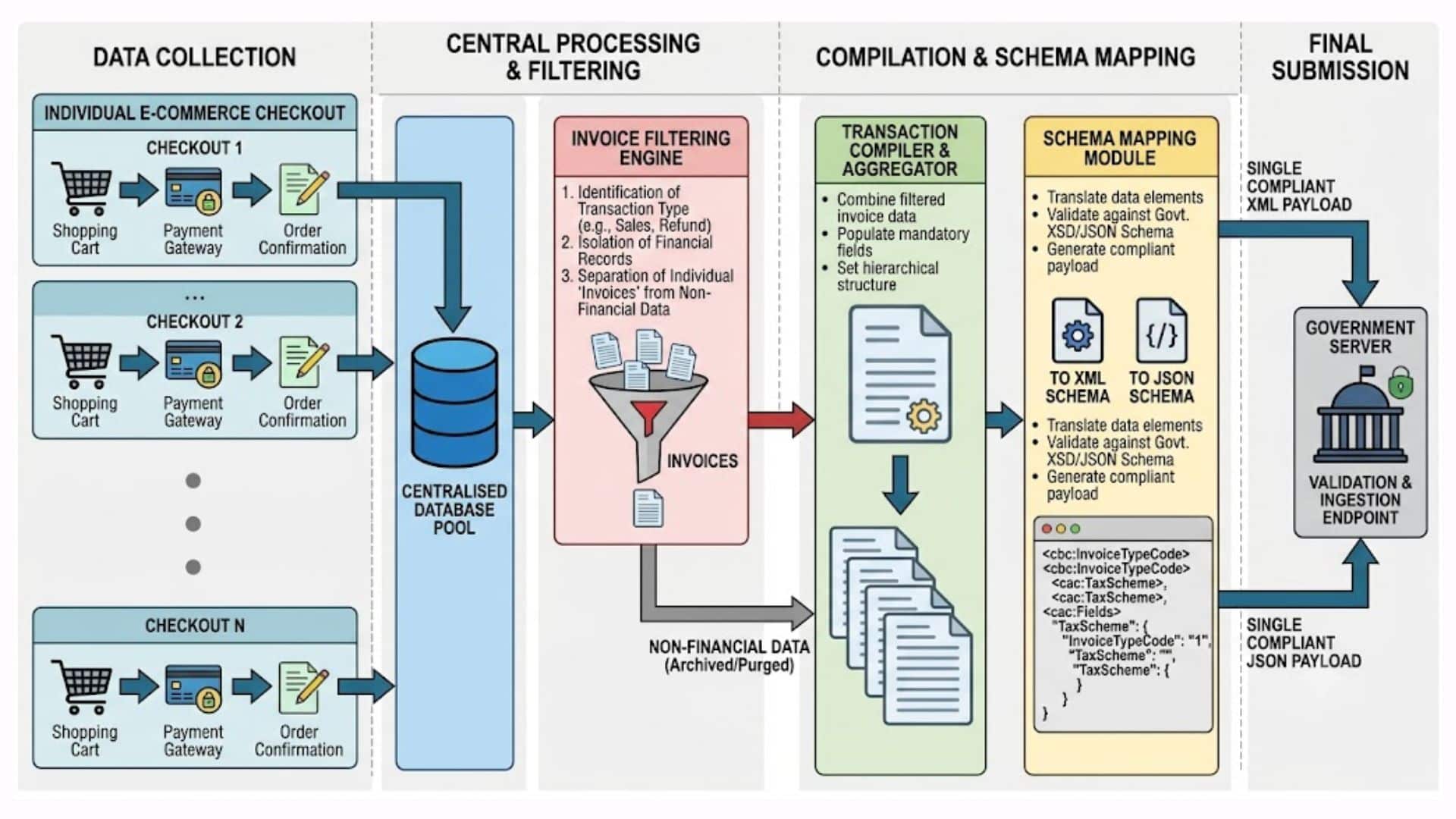
3. Validate and Submit via API or Portal
For small volumes, this file can be uploaded manually to the tax authority’s portal. For high-volume digital merchants, this is highly inefficient. Instead, your billing system or payment architecture should push the data via a secure API directly to the tax authority’s system for real-time validation and receipt of a unique cryptographic UUID (Universally Unique Identifier).
Step-by-Step: How to Submit a Consolidated e-Invoice via MyInvois Portal
Navigating the Inland Revenue Board of Malaysia (IRBM / LHDN) MyInvois portal for monthly consolidation follows a specific compliance pipeline. Here is the streamlined process for your finance team to execute within the mandatory 7-day post-month window:
Step 1: Initiate the Document
Log into the MyInvois Portal and click New Document on the left navigation panel. Select your required document type and choose the applicable document version available in the portal. Click Start.
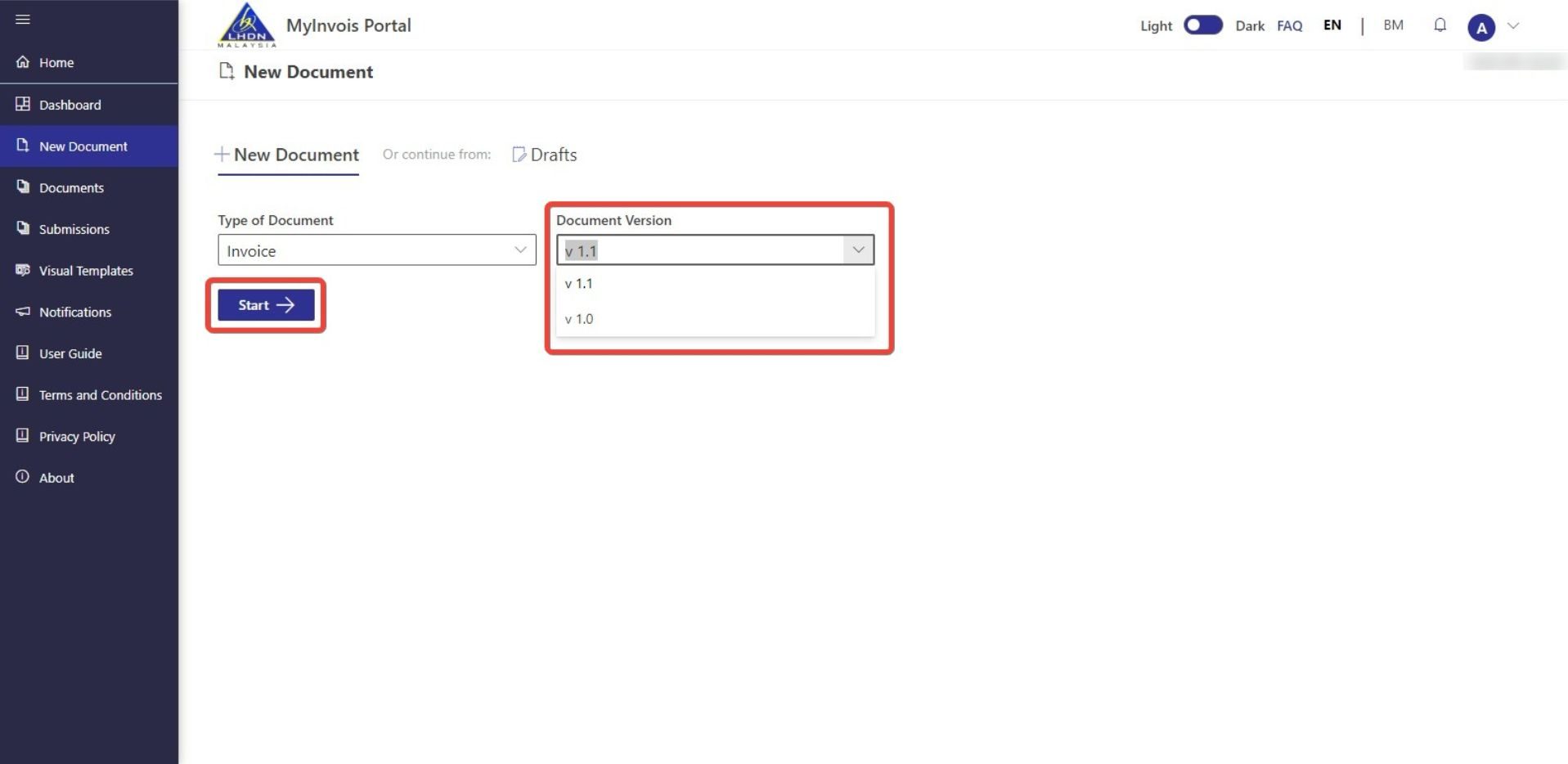
Source: MyInvois Portal. Screenshots are for illustrative purposes only and remain the property of LHDN.
Step 2: Enter Supplier & Buyer Profiles
- Supplier Details: Your Name, TIN, and SST numbers will pre-populate. You simply need to select your 5-digit MSIC Code and input your Business Activity Description (e.g., Retail sale via internet).
- Buyer Details: Because this is a consolidated B2C invoice for the general public, you will input the standard IRBM-issued generic buyer TIN (e.g., EI00000000010) and use generic public details rather than individual customer data. Click Validate to clear the portal’s system check and continue.
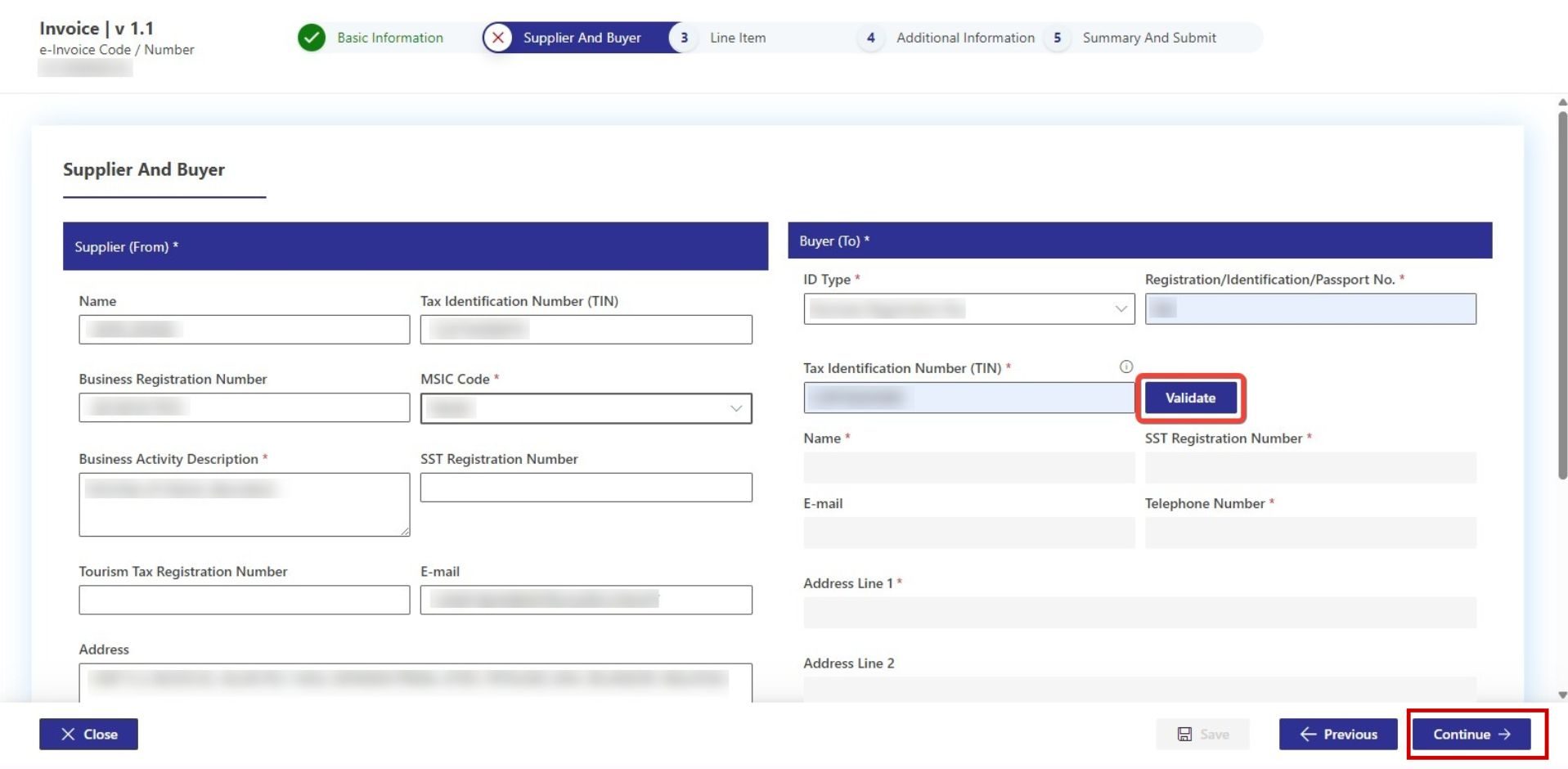
Source: MyInvois Portal. Screenshots are for illustrative purposes only and remain the property of LHDN.
Step 3: Log the Consolidated Line Items
Click Add Line to input your aggregated sales figures.
- Select Consolidated e-Invoice from the Classification Codes dropdown menu.
- Input a clear description (e.g., Aggregate Digital Services – October 2026), quantity, and total gross sales volume.
- Add the relevant Tax Type (e.g., service tax or sales tax percentages) and total tax amounts collected across those pooled transactions.
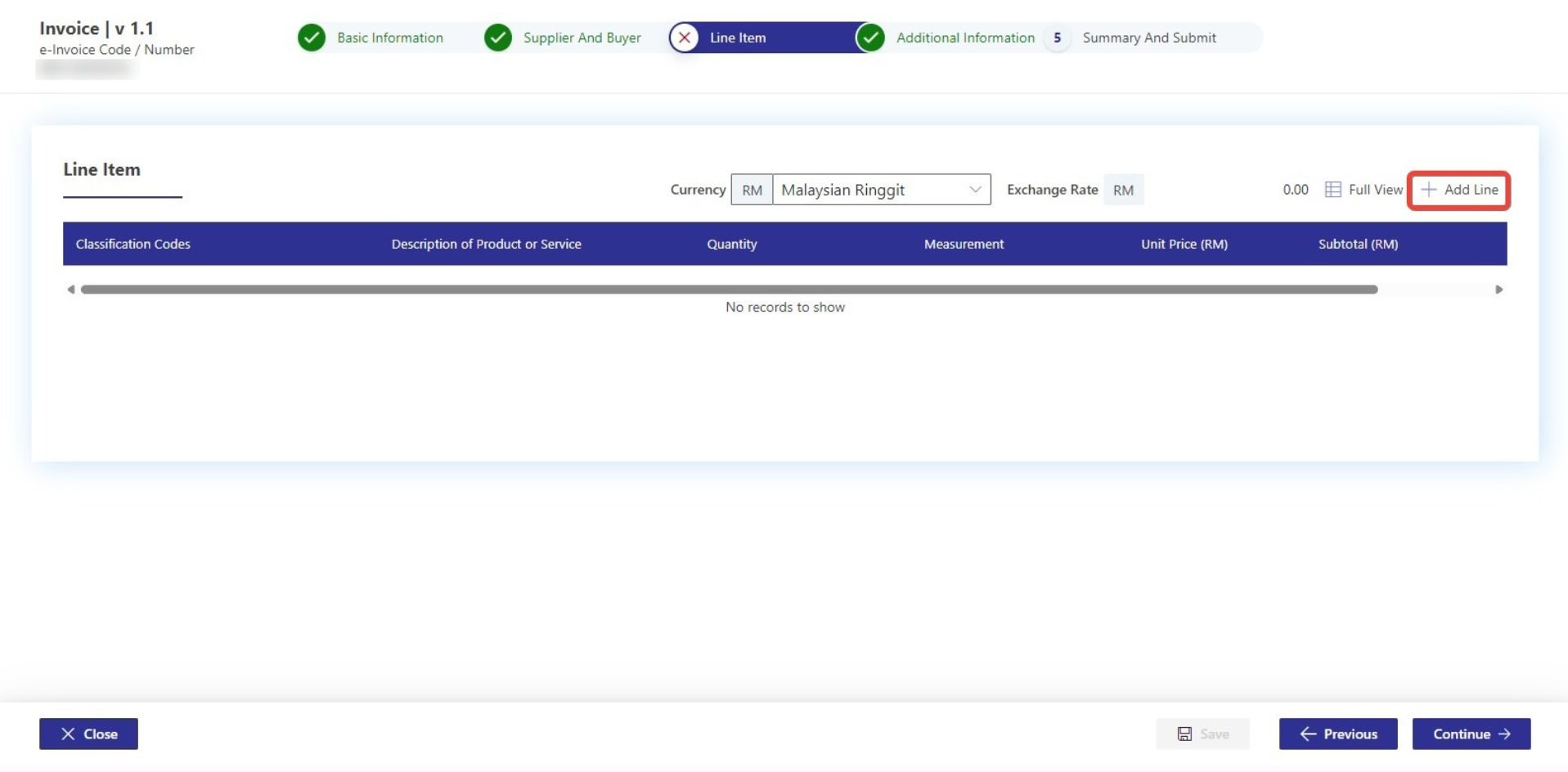
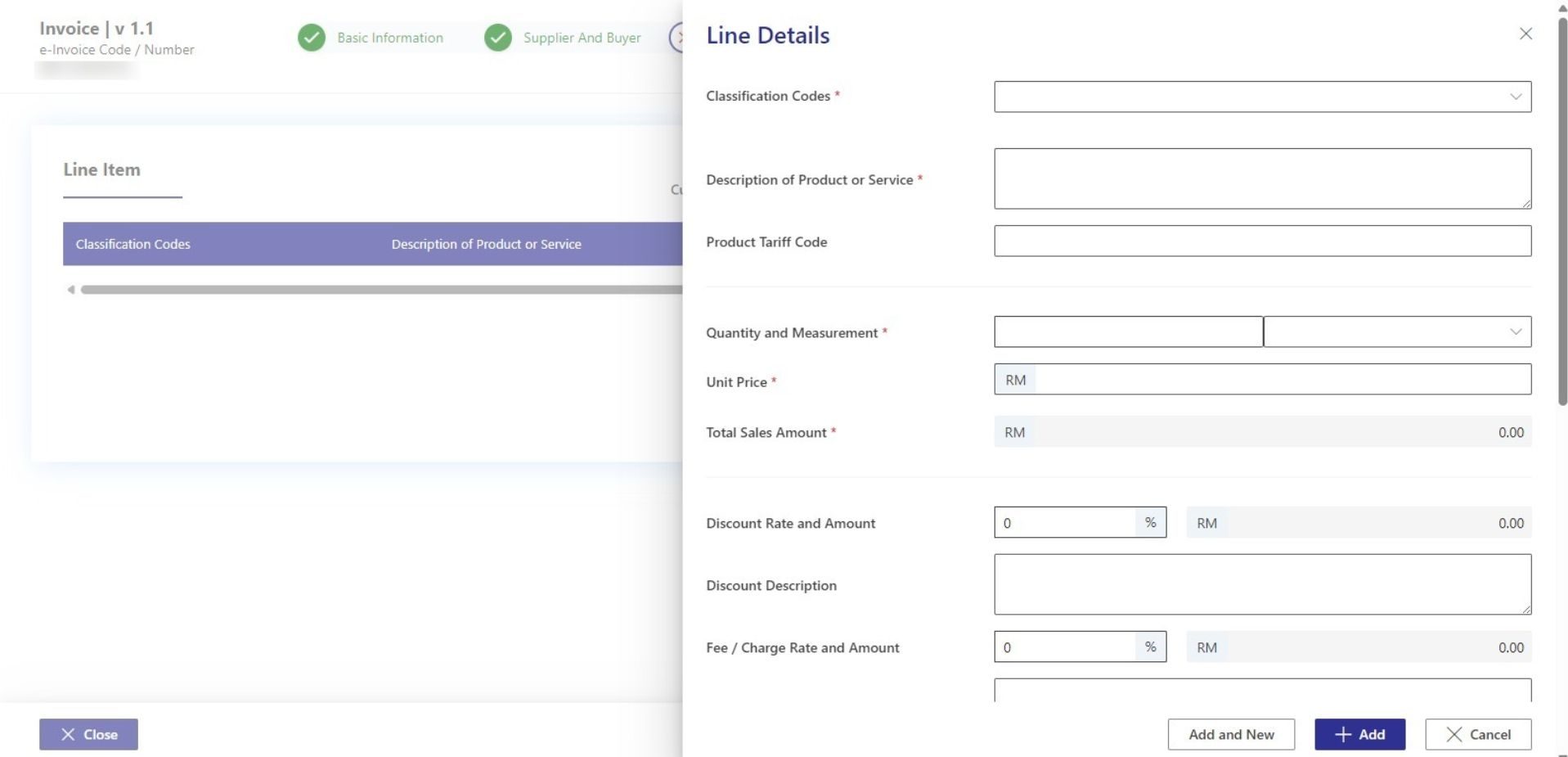
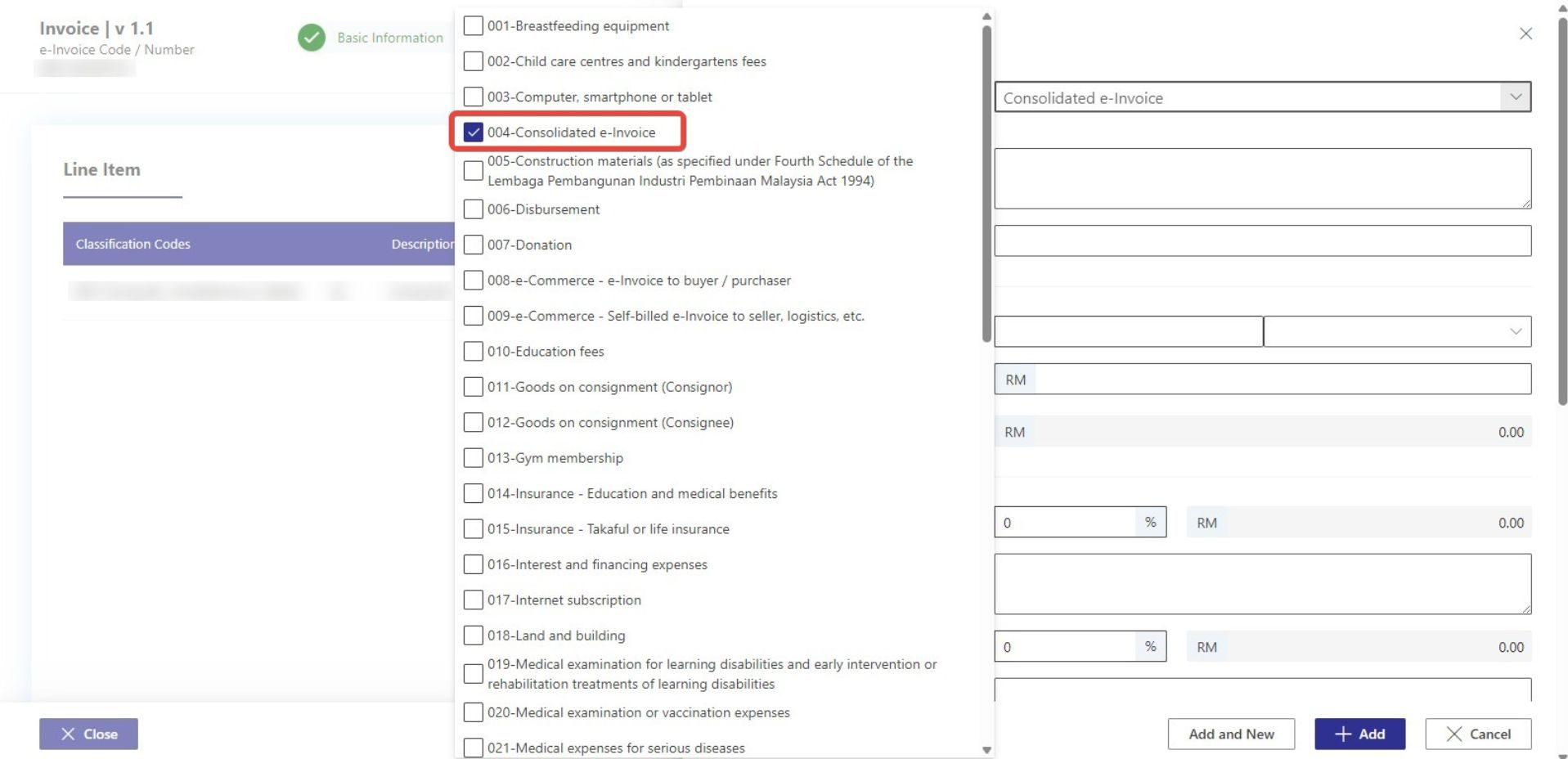
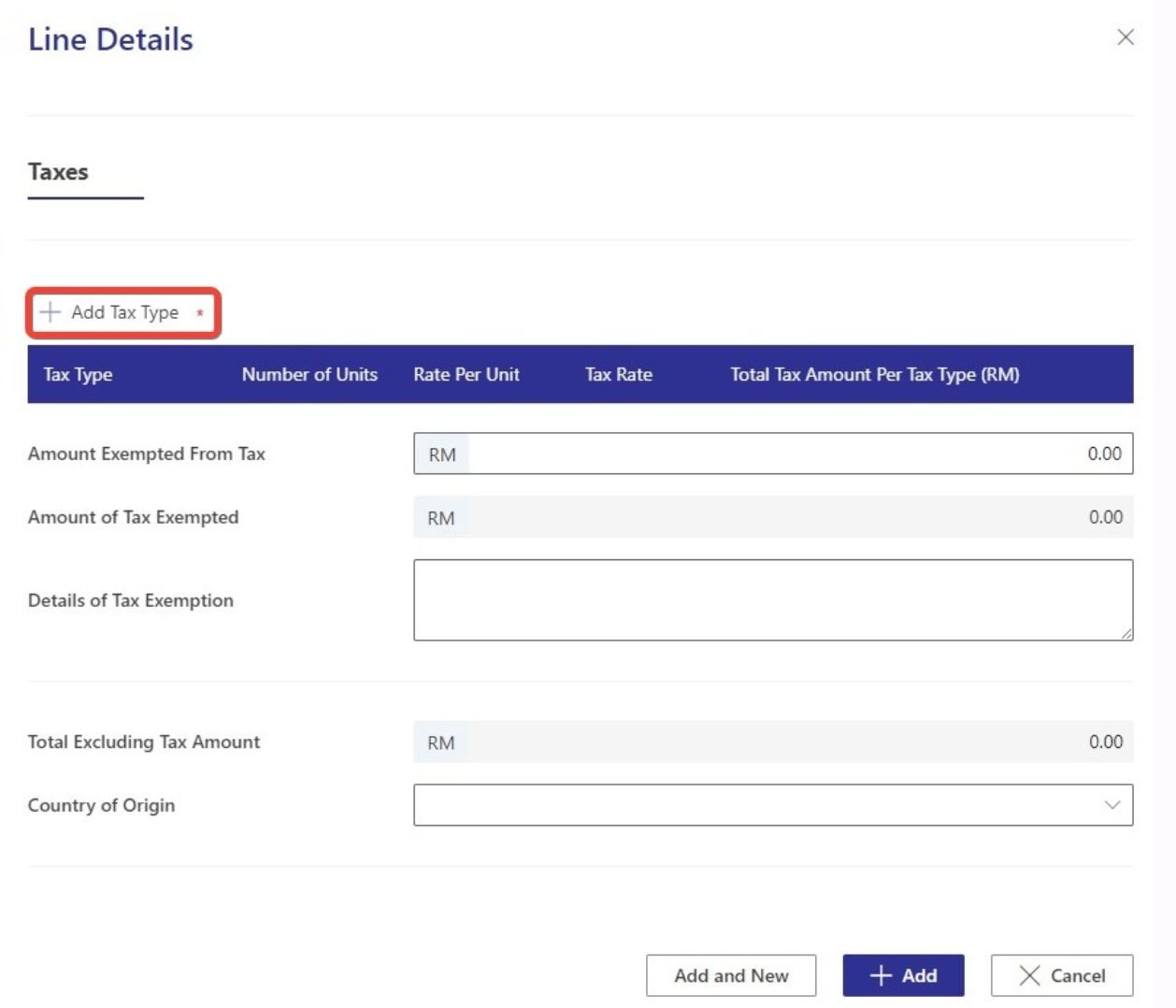
Source: MyInvois Portal. Screenshots are for illustrative purposes only and remain the property of LHDN.
Step 4: Input Billing & Payment Metadata
Under the Additional Information tab, define the Frequency of Billing as Monthly, alongside the exact Billing Period Start and End Dates. You can declare standard payment modes (such as e-Wallet/Digital Wallet or Credit Card) based on your transaction summaries.
Step 5: Review, Sign, and Submit
Proceed to the summary page to verify your aggregated numbers match your payment gateway’s accounting logs. Once confirmed, click Sign and Submit Document. Enter your digital certificate User ID and password to apply your cryptographic signature. Upon successful submission, the system will instantly validate the file and issue a unique UUID receipt.
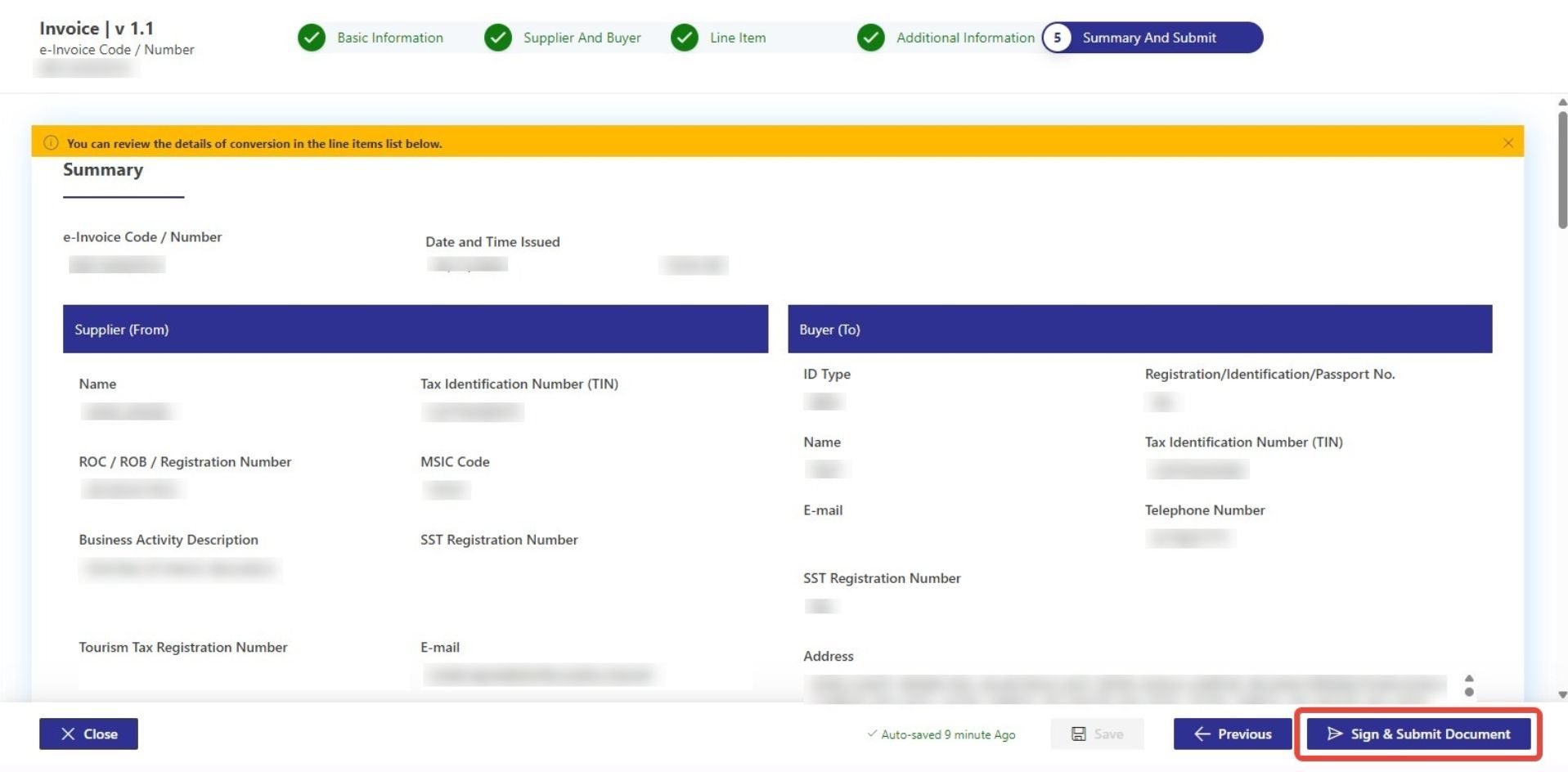
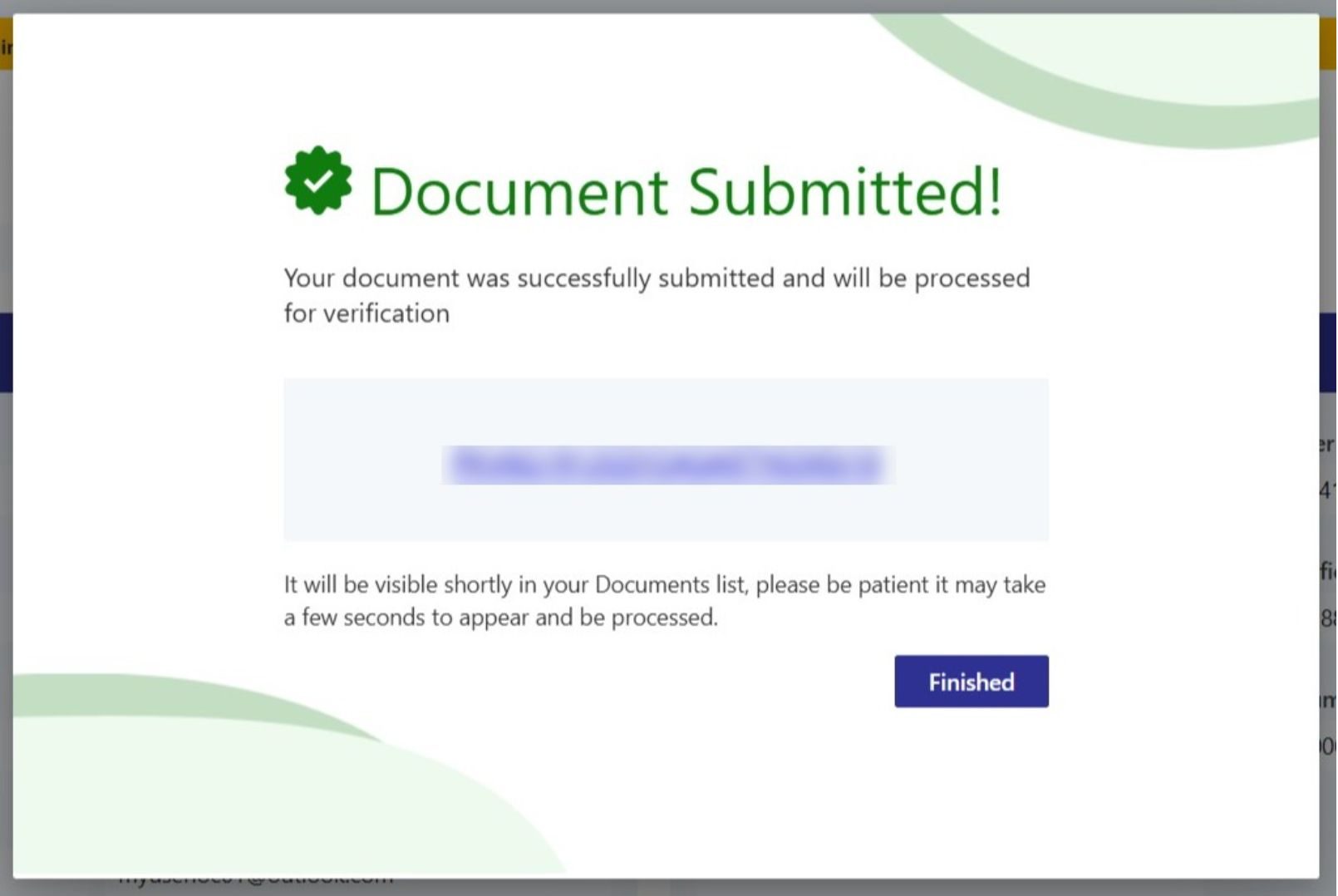
Source: MyInvois Portal. Screenshots are for illustrative purposes only and remain the property of LHDN.
The Operational Hurdle: Manual vs. Automated Consolidation
Managing month-end consolidation through multiple spreadsheets may increase the risk of reporting errors and reconciliation challenges. If your system fails to log a single transaction or miscalculates tax groupings, the entire monthly submission may face rejection, leading to potential fines and audits.
Reconciliation becomes challenging for high-volume merchants processing multiple payment methods, processing refunds, or dealing with multi-currency digital goods. Your finance team needs clean, structured data available instantly.
If your team spends days reconciling receipts for tax purposes at the end of every month, it is time to optimise your payment data environment.
Optimising e-Invoicing via Your Payment Gateway
The most logical place to accurately record data for tax preparation is at the point of payment. By leveraging an advanced payment gateway like Paydibs, the foundational data processing is streamlined.
Depending on the services and features used, Paydibs may provide access to transaction information, including payment records and related reporting through the Paydibs merchant portal, helping finance teams prepare consolidated transaction reports.
This clean data can be fed directly into your accounting software, ERP, or e-invoicing middleware to automatically map out the required LHDN legislative schema. By using structured transaction data from Paydibs, businesses may reduce manual data-entry errors and support their compliance and reporting processes.